Leveraged Liquidity Provisioning
Combine lending and liquidity provision to enter a Uniswap pool with more capital than you hold. You supply one token as collateral, VII Finance borrows additional capital against it, and both are deployed into the pool, creating a leveraged LP position that earns amplified swap fees.
Example: You hold WBTC and want leveraged exposure in the WBTC/USDT pool. Set leverage to 3x and VII Finance borrows USDT against your WBTC, swaps 2x USDT to WBTC and takes 1x WBTC from your wallet, deploys both into the pool, and holds the LP position as collateral backing the debt.
When to use this: You are an active LP who wants to maximise fee income without needing both tokens upfront. Leverage amplifies your LP TVL and the fees it earns relative to the collateral you provide.
At 3x leverage on a WBTC/USDT pool:
- You supply WBTC
- The protocol borrows 5x USDT equivalent to your supply
- 2x USDT are converted into WBTC using 1inch swap and 1x are pulled from your wallet
- Both 3x USDT and WBTC gets deployed in pool and is enabled as collateral
- Fees earned are ~5x what you'd earn without leverage
- You pay borrow interest on the 5x USDT
Leverage amplifies both fee income and losses. Impermanent loss, out-of-range positions, and price movement all affect your LP collateral value. If that value drops to the liquidation threshold, your position may be partially liquidated.
Prerequisites
- Wallet that supports EIP-7702 connected to VII Finance (Here's the list of all wallets that are supported)
- WBTC (or another token) in your wallet
- Enough ETH for gas fees
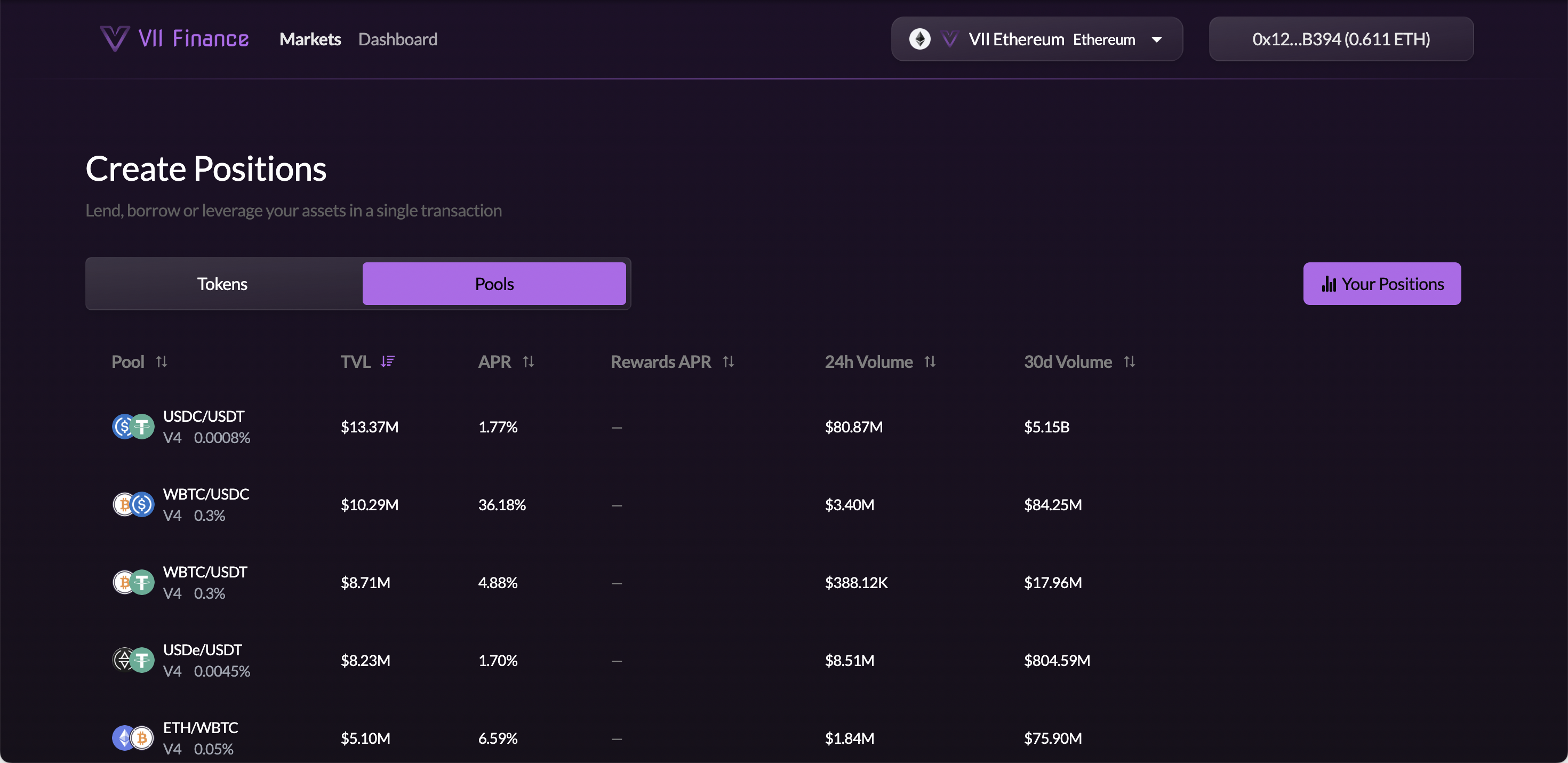
Step 1: Open Markets and Go to the Pools Tab
Navigate to Markets and click the Pools tab.
Step 2: Find Your Pool and Click Leverage
Browse or sort the table to find the pool you want to enter (e.g. WBTC/USDT). Hover the row. Supply, Borrow, and Leverage buttons appear on the right.
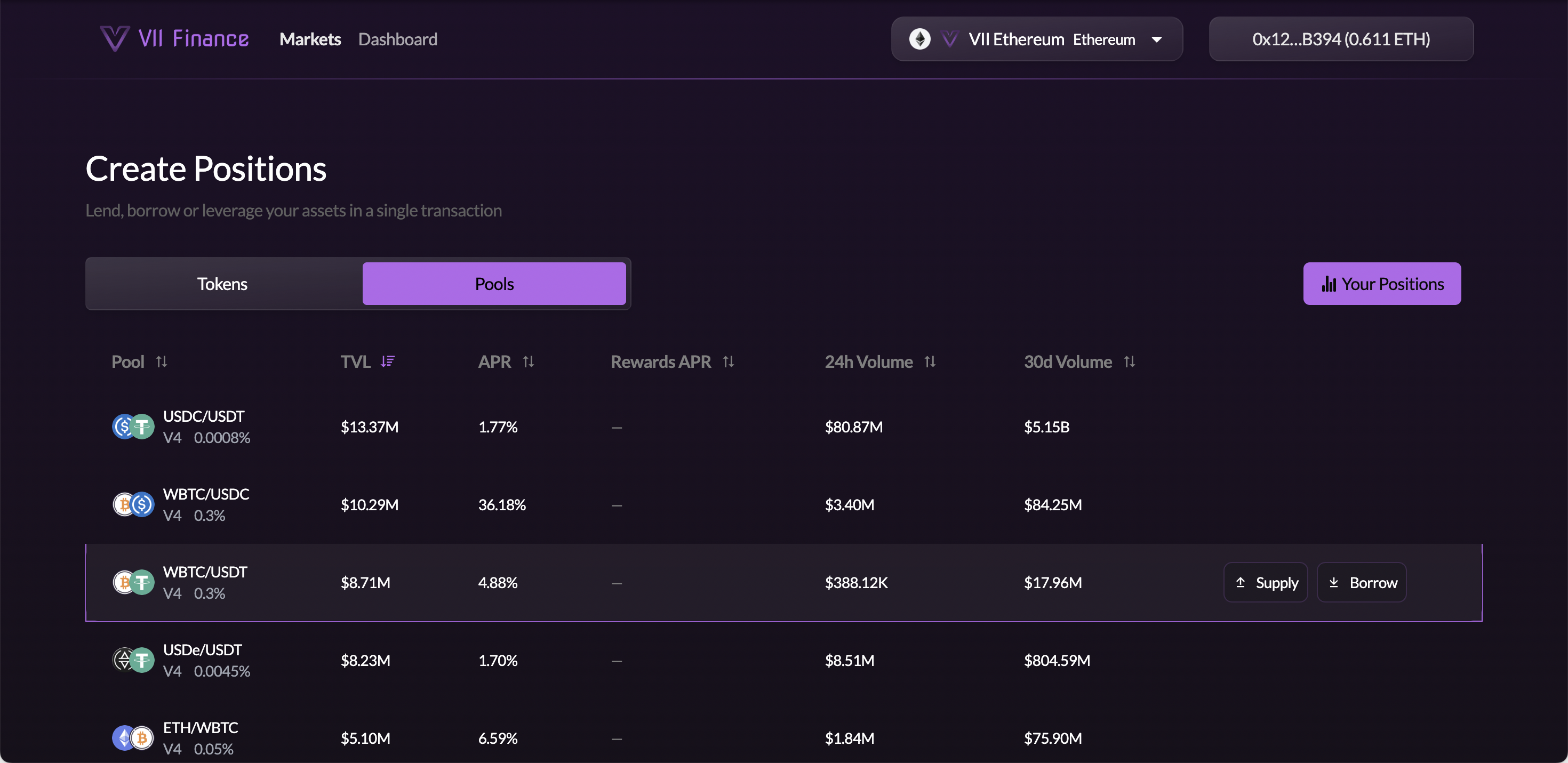
Click Borrow.
Step 3: Switch to the Leverage Tab
You are now on the Create Position page. The form opens on the Borrow tab. Click the Leverage tab to switch.
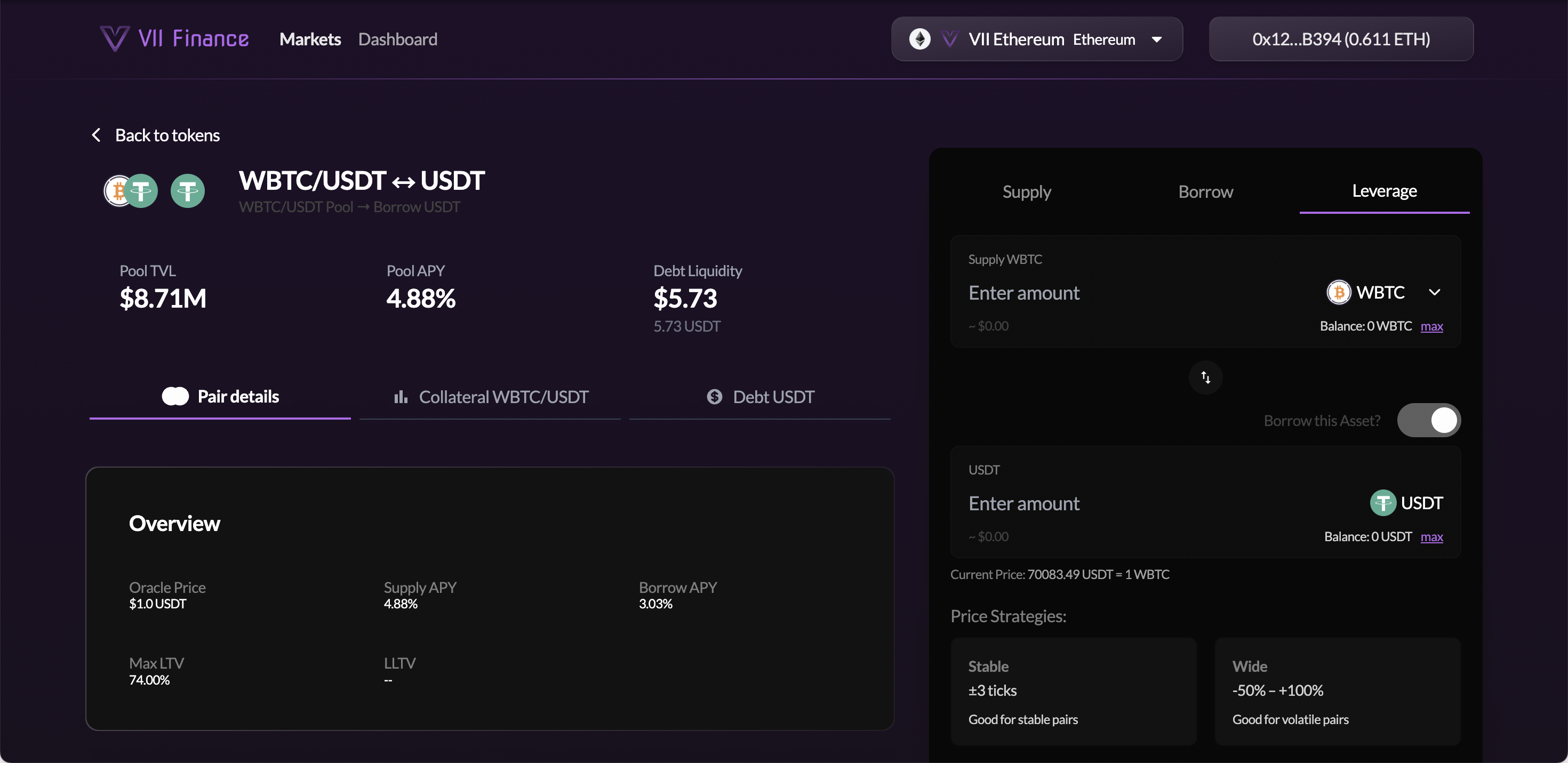
The right panel shows:
- Supply [token]: enter your collateral amount (e.g. WBTC); the token dropdown lets you switch the collateral asset
- Borrow this Asset? toggle: controls whether the protocol borrows the paired token on your behalf
- [Debt token]: auto-fills the USDT amount based on your collateral and the current price
- Current Price: live oracle price ratio between the two tokens
The left panel shows:
- Pool TVL, Pool APY, Debt Liquidity: at a glance pool stats
- Pair details tab: Oracle Price, Supply APY, Borrow APY, Max LTV, Liquidation LTV
- Collateral [Pool] tab: LTV risk parameters for this LP as collateral
- Debt [Token] tab: borrow rate and available liquidity for the debt token
Enter your collateral amount. The debt amount auto-fills based on the current price ratio.
Step 4: Choose a Price Strategy and Set Your Range
Your LP position earns fees only when the pool price is within your Min Price and Max Price range.
| Strategy | Description | Best for |
|---|---|---|
| Stable | ±3 ticks around current price | Stable pairs (stablecoin pairs) |
| Wide | −50% to +100% range | Volatile pairs with room to move |
| Full Range | No range limit (toggle) | Maximum resilience, lowest fee efficiency |
| Custom Range | Toggle to type Min/Max directly or use +/− buttons | Manual strategy |
WBTC/USDT can move significantly. The Wide preset (−50% to +100%) gives your position more room to stay in range during market swings.
Step 5: Set Your Leverage
Drag the Leverage slider to your desired multiplier. The slider range depends on the pool's Max LTV (for example, 0x to 3.8x for WBTC/USDT).
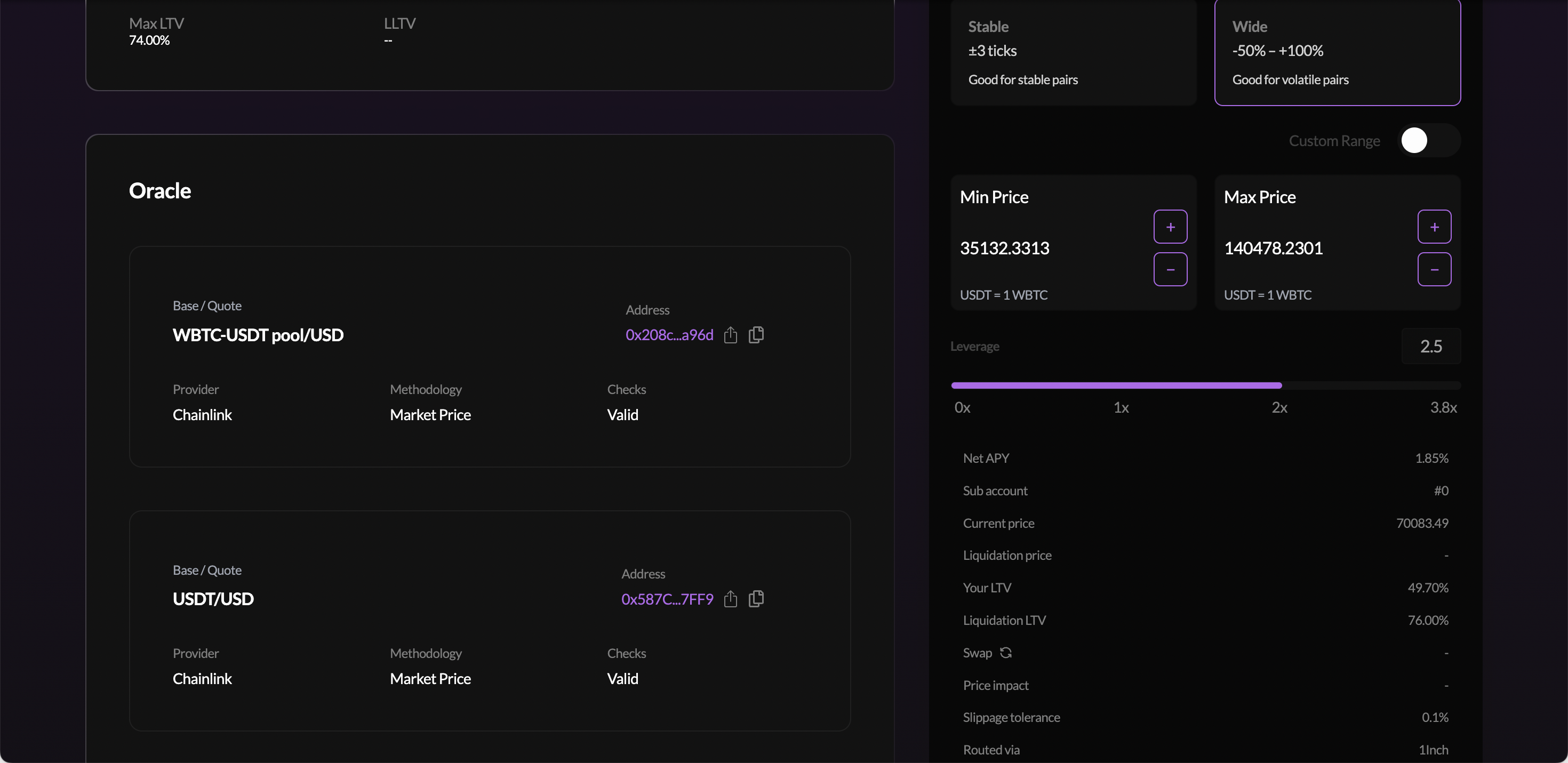
As you increase leverage:
- More of the paired token is borrowed → more LP TVL → more fee income
- Your LTV rises, less buffer before liquidation
- Your Net APY changes based on the balance of fee income vs. borrow cost
Step 6: Review Metrics and Submit
Before submitting, review the full metrics panel:
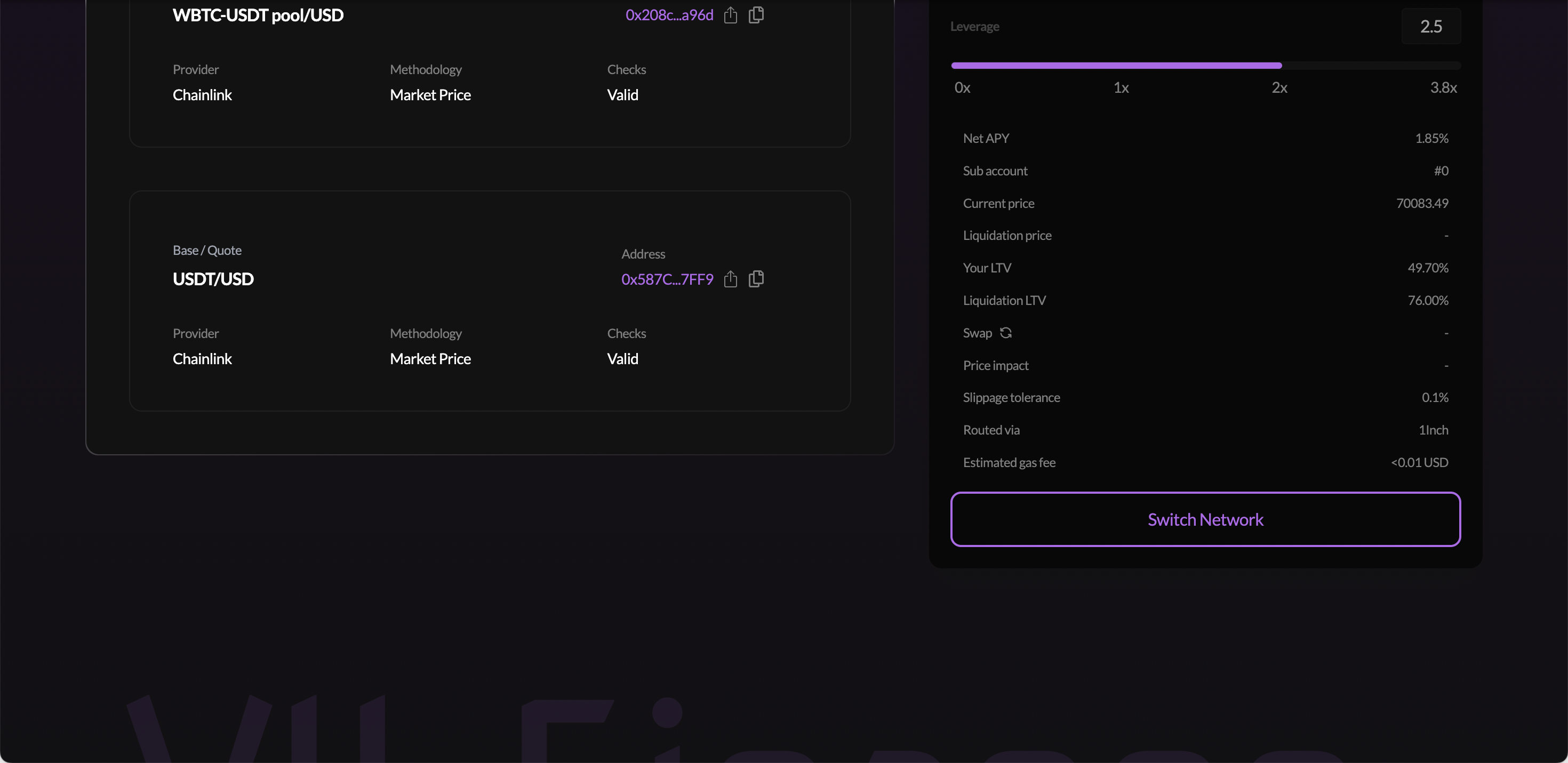
| Metric | What it means |
|---|---|
| Net APY | LP fee income minus borrow interest |
| Sub account | The Euler sub-account that will hold this position |
| Current price | Live oracle price between the two tokens |
| Liquidation price | The price at which your position can be liquidated |
| Your LTV | Current loan-to-value ratio |
| Liquidation LTV | Maximum LTV before liquidation is triggered |
| Swap | Estimated swap route (click the refresh icon to get the latest quote) |
| Price impact | Estimated slippage from any internal swap |
| Slippage tolerance | Maximum acceptable slippage (default 0.1%) |
| Routed via | DEX aggregator used for the swap (e.g. 1Inch) |
| Estimated gas fee | Approximate transaction cost |
Click the refresh icon next to Swap before submitting to get the latest on-chain swap quote. Rates change continuously, always refresh before confirming.
Even for correlated pairs, price moves can bring you closer to liquidation at high leverage. Start at 2x and build familiarity before going higher.
If your wallet is on the wrong chain, click Switch Network and approve the switch.
Click the submit button. Your wallet confirms a batch transaction that:
- Deposits your collateral token (e.g. WBTC)
- Borrows the paired token (e.g. USDT) from the VII Finance vault (with a 0.5% slippage buffer), sending the borrowed tokens to the LiquidityHelper contract
- If leverage > 1x: swaps a portion of the borrowed USDT into additional WBTC via the DEX aggregator (1Inch) to balance the pool ratio
- Deploys all tokens into the Uniswap pool at your chosen price range, minting the LP NFT directly into the VII Finance wrapper vault
- Registers the LP position as collateral backing the debt
The LP NFT is never sent to your wallet, it is minted directly into a VII Finance wrapper contract that holds it as collateral on your sub-account. You retain full economic ownership and can increase, remove, and collect fees from the Dashboard. The NFT will not appear in your wallet's NFT section or on Uniswap.
Managing Your Position in the Dashboard
After confirmation, go to Dashboard, then the Uniswap Position tab. Your leveraged LP position appears as a card showing Position amounts, Pending Fees, Price Range, and action buttons.
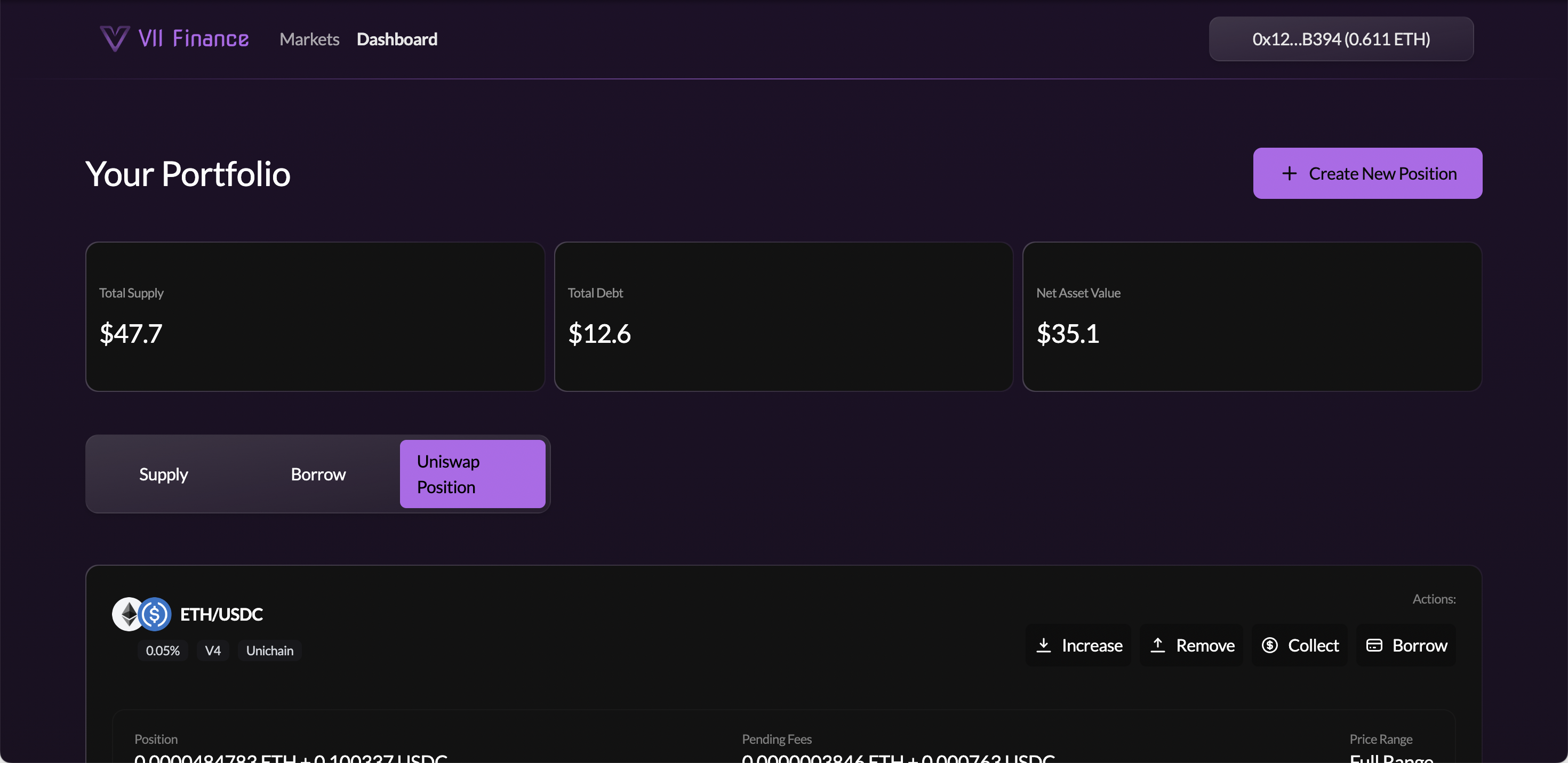
From the position card you can:
| Button | Action |
|---|---|
| Increase | Add more liquidity at the same price range |
| Remove | Withdraw a percentage of liquidity (10% / 25% / 50% / 100% or custom) |
| Collect | Claim accumulated swap fees into your wallet |
| Borrow | Borrow additional tokens against the LP (further leverage) |
Your debt is visible under the Borrow tab. Click Edit Position to repay debt, supply more collateral, or withdraw.
Swap fees accumulate inside the LP position and count toward its collateral value. Collecting them withdraws the fee tokens to your wallet, which reduces your collateral value and increases your LTV. The Collect modal shows your expected LTV after the action.
To fully exit: remove 100% of liquidity (returns both tokens), use the returned paired token to repay your debt, then withdraw your collateral.